
Fluid Player is a HTML5 lightweight video player, known for being fully customizable and flexible, and a favorite among website Publishers. In order to continue bringing improvements designed to maximize your traffic monetization results and improving your end user experience, we have recently added a Suggested Videos grid at the end of the main video in your website players. With the new Fluid Player Suggested Videos feature you can recommend new videos to watch to your end users, increasing their watch time by providing new interesting content, thus prompting them to stay on your website longer and making Fluid Player the best free video player to extend end user viewing time on website.
Fluid Player Suggested Videos feature: How to increase watch time on website with a HTML video player and all about video advertising and extending view sessions
As a website Publisher, you know the importance of keeping your website visitors on your page and extending the view time as much as possible and you are probably trying to figure out how to extend end user view sessions on your website. It is not only key for your website’s traffic metrics and Google rankings, but also for traffic monetization purposes. It is simple: The longer your end users decide to stay on your pages, the more chances to show them ads that align with their interests and which will grab their attention. One way to achieve this high end user retention is by offering entertaining video content, and in fact, according to Forbes (opens in a new tab), having videos on a website can result in a 88% increase in the average time spent on your pages. By showing video you provide an engaging and interactive experience to your end users and encourage them to spend more time exploring your content.
If you decide to monetize video content on your website and you are wondering how to increase watch time on website with a HTML video player, it is a good idea to work with a reliable Ad Server that brings you solutions on ‘how to use suggested videos to further monetize my website content’. Your ideal video Ad Server should support popular video ad formats such as In-Stream, Outstream and Slider, and offer its own free customizable video player.
About EXADS’ Fluid Player: The best free video player to extend end user viewing time on website
EXADS’ web video player Fluid Player can be easily integrated on your website (opens in a new tab) and is fully customizable, matching the look and feel of your website. It comes with lots of useful features including configurable Skip Ad & CTA buttons with Friendly URL and the Mini Player and works with Programmatic advertising. Below you can find the main features that make it the best choice for video monetization.
General Features: How to increase watch time on website with a HTML video player
- It’s completely free, with open source on GitHub
- Scripts and resources available via CDN
- APIs available for Control, Events and Utility
- Compatible with modern web browsers
- Easily customizable
- Supports multiple resolutions: 480p, 720p, 1080p
- Allows adding multiple video sources for user to switch between different video quality levels
- Ability to have more than 1 player per page
Monetization and user experience features
- Plays In-Stream & Live Streaming video ads (opens in a new tab)
- Has advanced VAST capabilities
- VPAID video metrics
- Custom call to action text when playing a video ad
- Compatible with any ad network, ad exchange or video ad server
Additional features
- Timeline Preview, Keyboard Shortcuts by key and Autoplay control features
- Has a custom HTML banner option, which shows when the video is on pause, as an ad text message in the top right corner of the video screen
- Allows multiple subtitles and captions
- Allows the addition of a custom logo
VAST Standards features
- Multiple VAST tags (pre-roll, mid-roll, post-roll)
- Linear (video) ads
- Non linear VAST tags (banner images (gif/jpg/png)): VAST nonlinear banner overlay support which works like an in-video ad allowing insertion of an image (gif/jpeg/png) during video playback
- VAST Wrappers
- VR and VPAID Ads (opens in a new tab) (Linear, Nonlinear, switch over from Nonlinear to Linear)
At EXADS we are constantly working on new Publisher features designed to help you maximize your advertising revenues. In order to help you further extend the end user time on your website, we have added the Fluid Player Suggested Videos feature.
About the Fluid Player suggested Videos feature: How to extend end user view sessions on your website
According to Chrome Webstore (opens in a new tab), suggested videos can double views on your video content! And this is where the new Fluid Player Suggested videos feature comes in. Suggested videos are recommendations that viewers may be interested in watching next, which appear at the end of a main piece of video content inside of the video players on your website. These videos include recommendations chosen by the website Publisher, so you will have full control of what is shown. This will improve your end users’ experience on your website by offering them new interesting content that they can enjoy, creating further monetization opportunities, making Fluid Player the best free video player to extend end user viewing time on website.
How does the Fluid Player Suggested Videos feature work: How to increase watch time on website with a HTML video player
So, how to use suggested videos to further monetize my website content? Here is how to increase watch time on website with a HTML video player: With the Fluid Player Suggested Videos feature, at the very end of a main video piece of content, the player will show a grid of up to 12 videos to prompt the end user to watch more video content thus extending viewing sessions. Note that the amount of videos will vary depending on the device used to view the content by the end user, as you can see in the examples below:
Desktop: On Desktop devices you will be able to show 12 video suggestions as a grid.

Mobile: On Mobile you the player will show a scrollable horizontal bar which will slide through the 12 videos.

How to set up Fluid Player’s Suggested Videos feature on your website
First off, if you haven’t started showing video content on your website with Fluid Player, this is your chance to do it! You can learn how to quickly do so here (opens in a new tab). Once you have Fluid Player up and running, configuring the Suggested Videos feature is easy. The main requirement is to provide a URL that returns a JSON file. This can be a static .json file or an API call that returns an array of 12 videos. When using an API, query parameters can be utilized to pass data of the current video, such as tags, to create a more accurate and personalized grid of suggested videos.
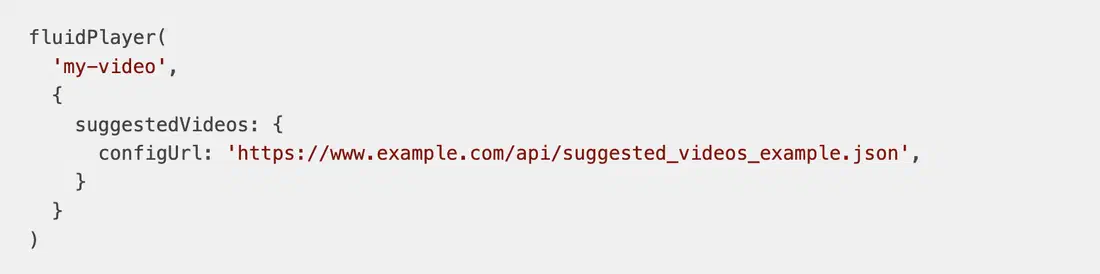
JSON example
The Fluid Player Suggested Videos feature expects an array of 12 videos to be displayed in a 4x3 grid format. This is a JSON example of all the data you can pass through per video. The required keys are id, sources, thumbnail, and title.
In the configUrl, a new URL that returns a JSON file with 12 new suggested videos can be provided.
Note: To enable subtitles for the player, these must be activated in the layoutControls. Simply providing subtitles is not sufficient.
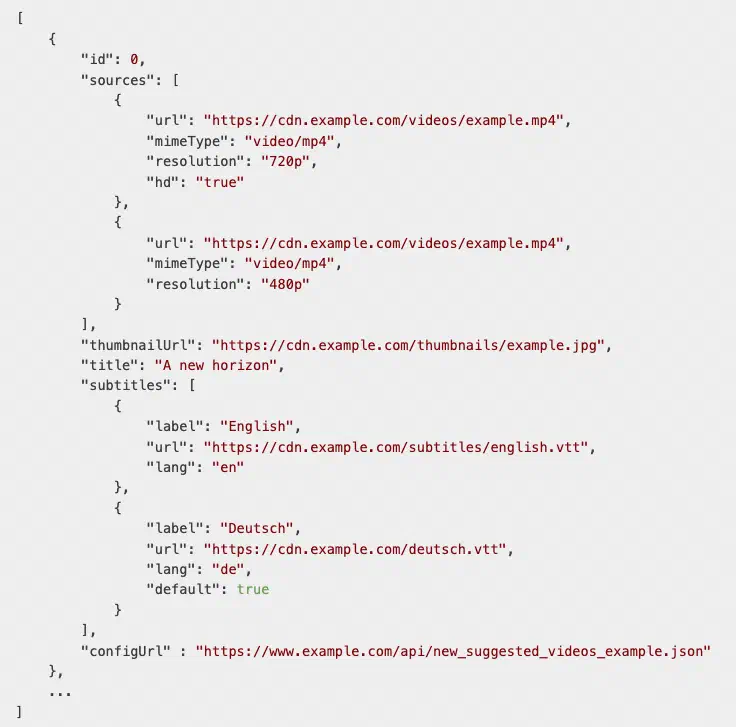
Fluid Player Thumbnail Recommendations
Fluid Player expects thumbnails to have a 16x9 aspect ratio. Thumbnails in other formats can be used, but a background color will be added to fill the space. For the best appearance, it is recommended to use the 16x9 aspect ratio.

Conclusion: Fluid Player Suggested Videos feature
Video players are key to successfully monetizing video on your website, having a massive impact on your site’s end user experience and your advertising revenues. Now you know how to increase watch time on website with a HTML video player, and Fluid Player can be a great choice as it delivers for both the end user and the business, becoming the perfect companion to the EXADS ad serving solutions! If you want to find out more about Fluid Player or the EXADS’ platform Ad Serving capabilities on how to extend end user view sessions on your website, get in touch with us. Learn more about the best free video player to extend end user viewing time on website now!