
As 2026 draws to a close, we’re looking back on a busy year of building. From connecting your AI assistant directly to your account and one-click RTB partner setup, to cookieless retargeting, new ad formats, and richer Statistics, this year’s updates were shaped by your feedback and built to make the platform faster, smarter, and more profitable to run. Here’s a round-up of everything new across the platform for networks, advertisers and publishers, so you can head into the new year making the most of it.
General Features
Calculated Metrics
Statistics and Dashboards now include a set of ready-made calculated metrics, so you no longer need to export data to work them out yourself. Advertisers can track RPM, RPC and ROAS alongside their existing conversion data, while Total Impressions, Fill Rate, Margin Rate and distribution metrics give networks a clearer view of delivery and revenue. Each metric shows its formula in a tooltip and can be switched on from the Settings menu.
Vertical Video
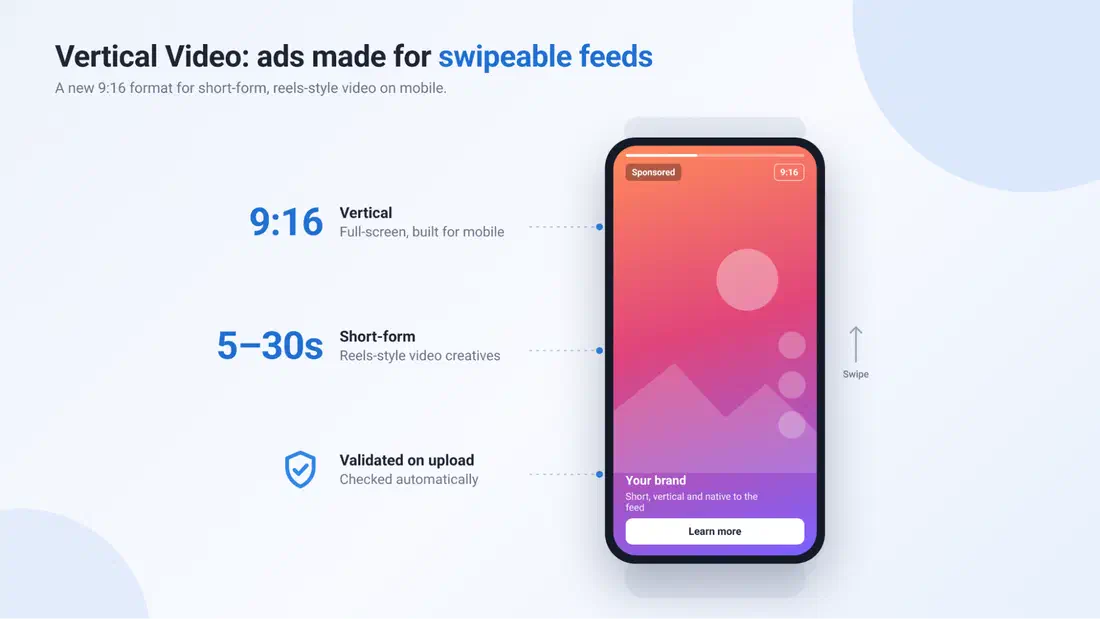
Vertical Video is a new ad format built for short-form, reels-style video feeds on mobile. Advertisers can upload 9:16 video creatives of 5 to 30 seconds and target the new Vertical Video zone type, with creatives validated automatically on upload. Publishers can create Vertical Video (VAST) zones to monetize their swipeable video feeds with ads that match the content around them.
EXADS MCP
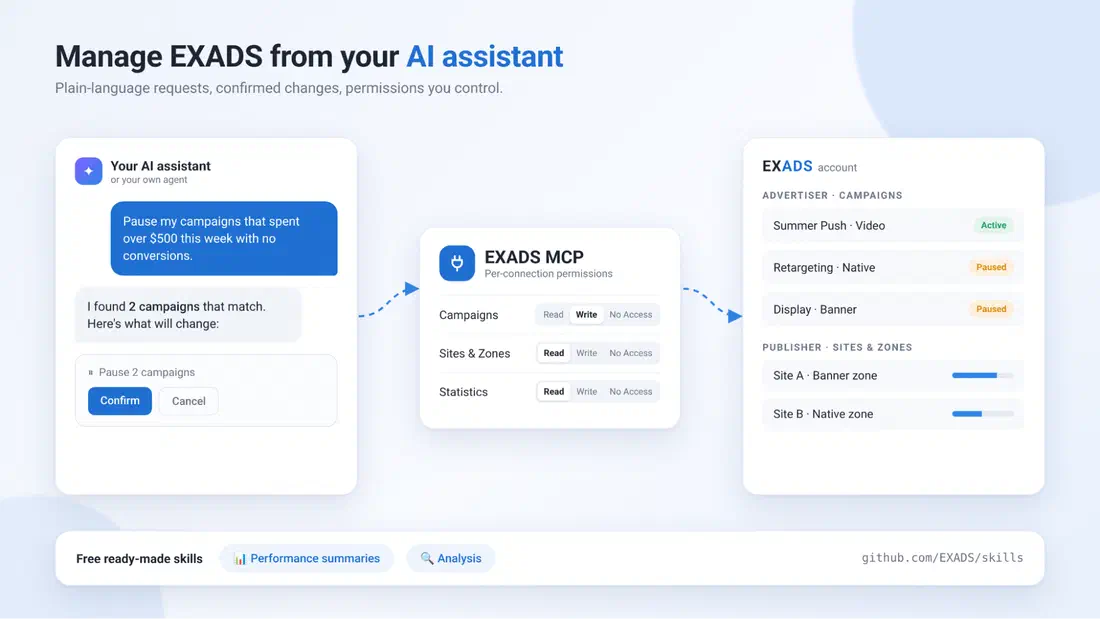
Connect your AI assistant (Claude, Cursor or your own agent) directly to your EXADS account. Advertisers can view and manage campaigns, and publishers can view and manage sites and zones, all in plain language, with every change confirmed before it’s applied. You stay in control: choose Read, Write or No Access per capability for each connection. To get started quickly, install our free ready-made skills from github.com/EXADS/skills for instant performance summaries and analysis.\
Retargeting Without Third-Party Cookies
Returning users are now identified through EXADS User ID Mapping instead of third-party cookies, so retargeting and conversion tracking keep working as browsers drop third-party cookie support. Rolled out worldwide this year, it includes server-to-server retargeting for advertisers who can’t place a pixel on their pages.
Statistics & Dashboards Usability Improvements
Date presets such as Last 7 days no longer include the current, incomplete day, so short-period trends are no longer skewed, and the date range filter has a consistent layout on desktop and mobile. The Last 6 months dashboard widget now shows month-to-date plus the previous five full months.
Responsive Full-Page Interstitials and New RDA Layouts
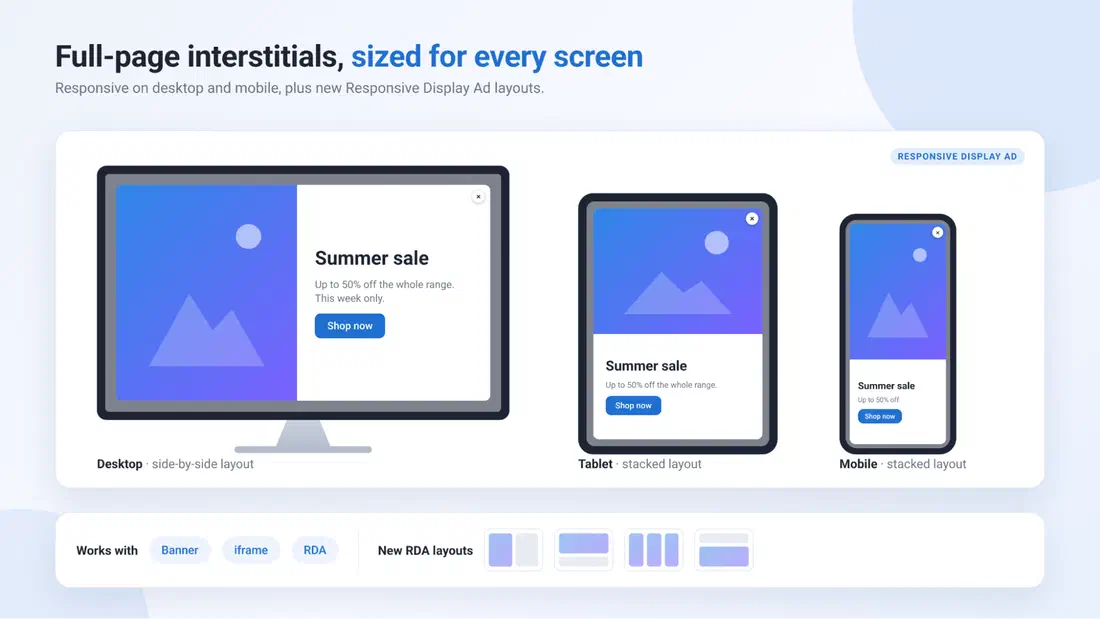
Full-page interstitials now scale to the available screen on desktop and mobile across banner, iframe and RDA media types, instead of rendering at banner-like sizes, so advertisers get the format’s full visual impact and publishers get a more valuable placement. New Responsive Display Ad layouts are also available for zones and campaigns with RDA enabled.
Administrator Features
AdSecure Integration
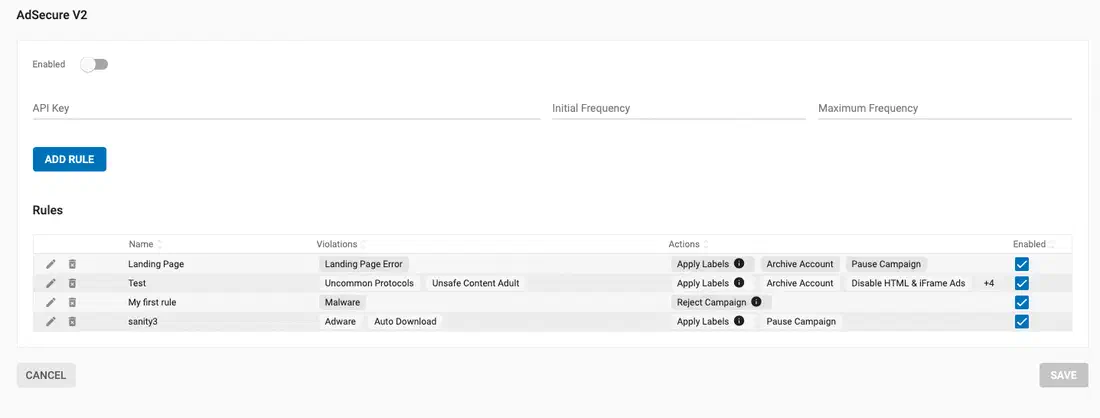
Networks can now connect their AdSecure (opens in a new tab) account directly from Admin > Apps to scan campaign creatives and landing pages for malware, phishing, unwanted redirects, and other violations. Admins build their own rules, choosing which violations to react to and what happens next, such as pausing or rejecting the campaign, rejecting the asset, applying a label, or notifying the team. This keeps harmful ads off your network without constant manual review.
Labels for Accounts
Admins can now add labels to advertiser and publisher accounts, with up to 20 labels per account, and edit them directly from the Accounts table. A new Labels column and multi-select filter make it quick to group accounts by any criteria you choose, such as region, account manager, or client tier.
IXOPAY Integration
Card payments can now run through IXOPAY, a payment orchestration platform that routes transactions across multiple acquirers from a single integration. Advertisers see one simple card payment button for manual recharges and can enable Auto-Recharge to keep their balance topped up, while routing and fallbacks are handled behind the scenes for more reliable payments.
Terms & Conditions Re-Acceptance
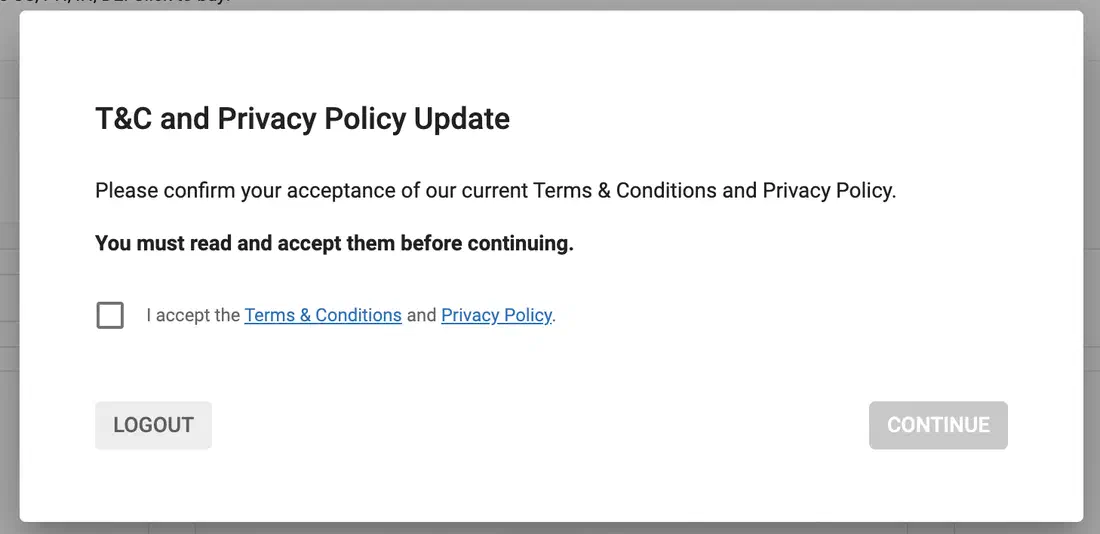
When your Terms & Conditions or Privacy Policy change, admins can now ask every advertiser and publisher to review and accept the latest versions. A single “Request New Review” option in Admin Settings triggers a mandatory acceptance screen at each user’s next login, and each account’s last accepted date is recorded and logged for compliance.
External Payment
Networks can now offer advertisers an External Payment option for methods handled outside the platform, such as local bank transfers or crypto. Advertisers see your custom title and instructions with a Pay Now button that opens your payment provider, and balances are updated once the payment is confirmed.
Archiving Inactive Accounts with Unverified Emails
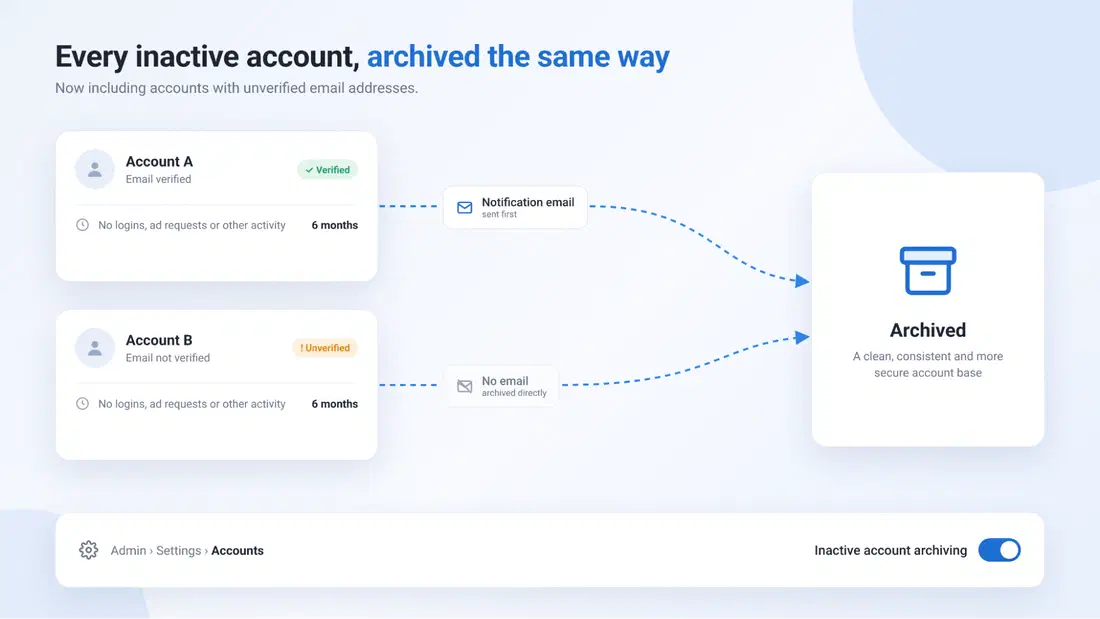
The inactive account archiving process now also covers accounts with unverified emails, so every inactive account is treated the same way, whatever its verification status. An account is considered inactive when there has been no login, ad request or other account activity for six months. As these accounts have no verified email address, they are archived directly without a notification email. Admins can turn inactive account archiving on or off at any time from Admin > Settings > Accounts, keeping your account base clean, consistent, and more secure.
Bulk Actions for CRM Messages
Managing CRM messages is now much faster with the new bulk action bar, available on both the main CRM tab and the CRM tab within each Account Profile. Admins and support teams can select multiple messages and then mark them as Read or Unread, Archive them, or Restore them in a single step, with no more editing messages one by one.
Crawler Traffic Detection
Crawler traffic from Googlebot and other known bots is now detected by IP and User-Agent independently and flagged as invalid on both impressions and clicks, so it is not charged to advertisers. A per-network switch lets admins disable click invalidation where needed.
New Network Statistics Dimensions
Network Statistics and Dashboards gained new dimensions and filters, including Campaign Groups, Campaign Display Position, Ad Serving Hostname, and Impression Invalid Reason, with a matching Invalid Impressions metric.
Advertiser Only Features
Block ISPs from Statistics
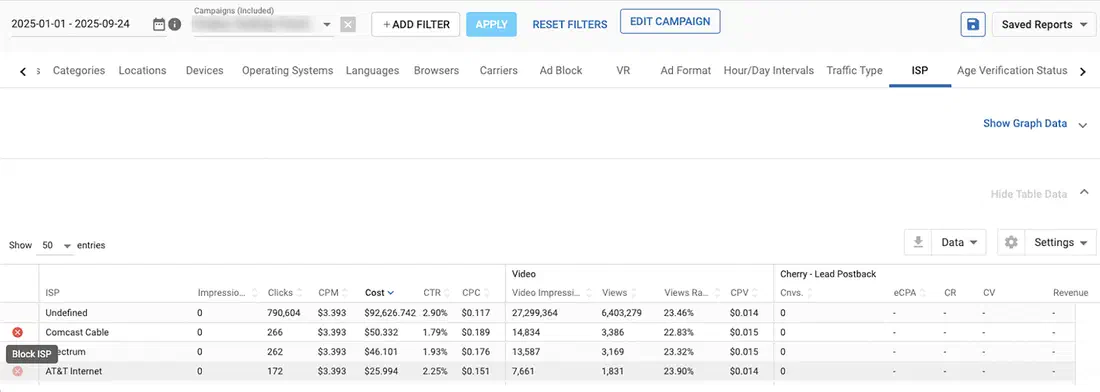
Advertisers can now block or unblock an ISP straight from the Statistics page, just as they already can for other targeting dimensions. Filter by a single campaign, open the ISP breakdown and click the block icon next to any underperforming ISP, with no need to go back and edit the campaign.
ISO2 Country Code Token for Landing Page URLs
A new {country_iso2} token adds the visitor’s two-letter ISO country code (for example, US or GB) to your landing page URLs. Many tracking and attribution tools work with ISO2 codes, so this makes it easier to pass country data straight into your reporting without extra mapping. The token works across all campaign types, including RTB, and the existing {country} token is unchanged and continues to return three-letter codes.
New Filters on Marketplace: Categories, Subcategory, Countries and Allowed Product Category
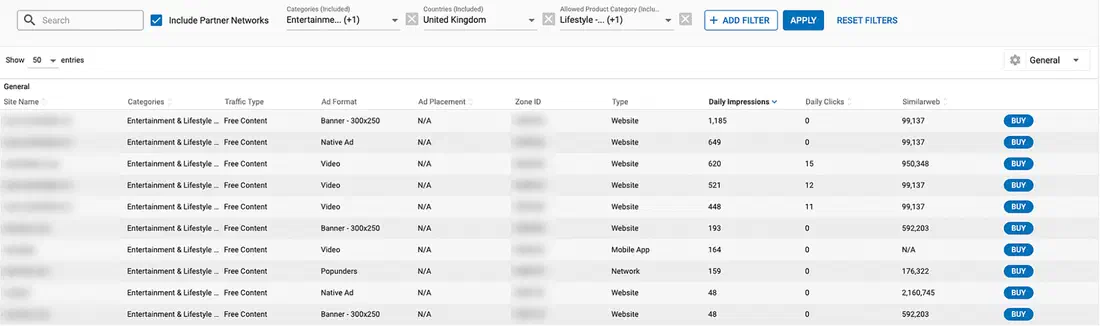
Finding the right inventory on the Marketplace is now quicker, with new and improved filters. The Category filter has been upgraded and renamed Categories. For ad servers that use subcategories, options now display as Category – Subcategory, matching the Statistics page and the Marketplace table. A new Countries filter narrows zones by the geographic origin of their traffic, so advertisers can find inventory that reaches their target markets. And for networks with Allowed Product Category enabled, advertisers can filter zones by the product categories they accept, confirming a zone suits their products before buying.
Browsers, OS & Devices Targeting and Statistics Update
The Browser, OS and Device lists in targeting and Statistics were refreshed to match today’s traffic: fast-growing options like Brave, HarmonyOS and newer mobile brands are now targetable, legacy entries were folded into Generic, and Safari desktop and mobile were merged. The list is kept current, with macOS 27 and iOS 27 added within days of release.
New Advertiser Statistics Dimensions
Advertisers can now break down campaign performance by Ad Placement, Variation, Landing Page and Landing Page Group in Statistics and Dashboards, with matching filters. This makes it possible to see which creative and which landing page drive results without exporting data.
Publisher Features
Ad Refresh for Native Ad Formats
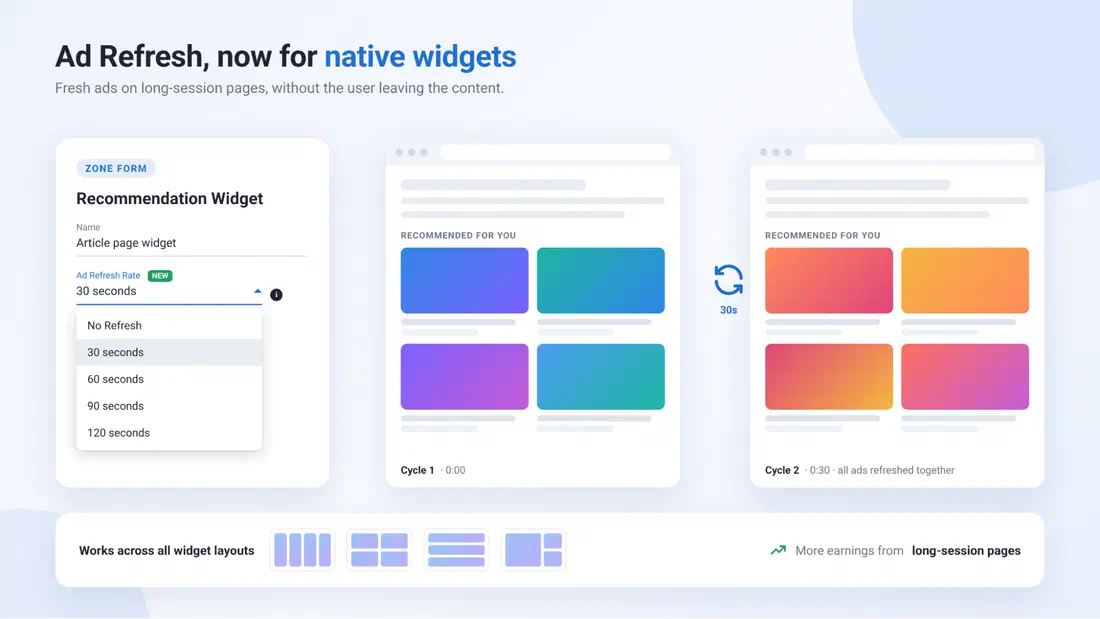
Ad Refresh, already available for banners, now works on Native Recommendation Widget zones across all layouts. Choose a refresh interval from the new Ad Refresh Rate setting in the zone form, using the same options available for banners, and all ads in the widget refresh together on each cycle. It’s an easy way to earn more from long-session pages where users stay on the same content.
New Ad Tag for Web Push Notifications
Web Push Notification zones now use our new ad tag, bringing them in line with the other ad formats already on the new tag. The new tag supports sub IDs and keywords, so you can track and segment your push traffic in more detail, and passes TCF/GDPR consent parameters to help you stay compliant. Simply grab the updated tag from your zone to start using it.
Better Revenue Defaults for Publisher Zones
New Banner and Native zones now come with Ad Refresh enabled at 30 seconds by default, typically adding 10–15% in volume. Popunder zones default to 1 per hour frequency capping; the capping maximum was raised to 20, and zone tags can be generated with flexible sizing.
Programmatic RTB Features & Improvements
RTB Client Specific Templates
Connecting with RTB partners is now a one-click setup, with no technical know-how required. Select a partner and the correct OpenRTB configuration is applied automatically, with partner-defined settings locked so they can’t be misconfigured. Existing OpenRTB 2.4 and 2.5 integrations continue to work exactly as before.
OpenRTB-Compliant OS Version in RTB Bid Requests
RTB bid requests now send the OS name and version in separate fields (os and osv), in line with OpenRTB 2.4 and 2.5 specifications. For example, an iOS 18 device is now sent as “os”: “iOS” and “osv”: “18” rather than combined in a single field. The change applies to both supply and demand bid requests, improving compatibility with partners that require the standard format and reducing rejected requests.
Managing Discrepancies with BURL
RTB impressions and clicks can now be counted from server-side billing notices (BURL) instead of pixels, aligning reporting with what’s actually billable. New Served metrics in Statistics and Dashboards show rendered delivery alongside, so discrepancies are easy to spot.
A new setting on OpenRTB 2.4 and 2.5 RTB zones, Count Metrics via Billable Events (BURL), lets you count impressions and clicks from server-side billing notices instead of pixel-based tracking. This aligns your reported numbers with what your supply partners actually bill for, reducing discrepancies. New Served metrics in Statistics and Dashboards, including Served Impressions, Served Clicks, and their ratios, show rendered delivery alongside billable delivery, so any gap is easy to spot. The setting is off by default, and frequency capping is unaffected.
What’s Next?
These updates are available now on the EXADS platform. If you have any questions or would like a walkthrough of any of these features, reach out to us to Get Started! Stay tuned for more updates coming soon!