
Advanced targeting options help your Advertiser clients achieve a better message reception, better engagement, and higher conversion rates, ultimately generating a more profitable outcome for everyone involved including you. This is why it is important to work with an Ad Platform that allows you to offer the best possible targeting settings. To help you choose which EXADS Ad Server precision targeting options for Advertiser clients you need, we have listed them all below: Ad Zones, Browser, Contextual, Time Schedule, Device, Location/GEO, Keyword, Mobile Carrier, Operating System, Domains, IPs, Behavioral Retargeting, Key Value Pairs, and more.
Ad Server Precision Targeting Options for Advertiser Clients: GEO** Targeting**
The item on our list of EXADS Ad Server precision targeting options for Advertiser clients is GEO Targeting. With this targeting option, Advertisers can target users based on their geographic location. This allows advertisers to run localized campaigns or exclude traffic from certain regions if they want to focus on specific geographic areas and can be done at various levels, including:
- Country: Target specific countries or exclude certain countries.
- Region/State: Target users in specific states, provinces, or regions.
- ISP: EXADS also lets Advertisers target based on the Internet Service Provider (ISP) a user is using.
Device Targeting
The second item in the list is Device Targeting. EXADS provides the ability to target users based on the device they are using. This is particularly useful for campaigns that are optimized for specific device types, such as mobile-first ad creatives or desktop-only promotions:
- Desktop: Target users on desktop computers.
- Mobile: Target users on smartphones and tablets.
- Device Type: Target based on the device’s manufacturer (e.g., Apple, Samsung).
- Other devices like Console, CTV, Tablet or Wearable Devices
Operative System Targeting
EXADS’ Operative System targeting option allow Advertisers to tailor their campaigns based on the specific operating systems (OS) that users are on, such as Windows, macOS, iOS, Android, and more. This targeting option enables Advertisers to optimize their ads for different device environments, ensuring compatibility and improving the overall user experience. By targeting users based on their OS, advertisers can refine their strategies, enhance engagement, and drive better results for platform-specific audiences.
Carrier Targeting (Mobile Carriers)
For mobile ads, EXADS offers targeting based on the user’s mobile carrier. This allows Advertisers to direct their ads to users on specific networks, which can be useful in campaigns for specific carriers or regional promotions.
Browser Targeting, a powerful Ad Server precision targeting option for Advertiser clients
For this Ad Server precision targeting option for Advertiser clients, Advertisers can choose from 27 browser options. This is useful if an Advertiser wants to display ads to users using a specific browser that is compatible with their content or ad format. Common browser options include:
- Google Chrome
- Mozilla Firefox
- Safari
- Microsoft Edge
- And more
Language Targeting
With this targeting option Advertisers can target users based on the language they are using on their device. For example, if they want to show ads to Spanish-speaking users, Advertisers can set the targeting to include users who have their device set to Spanish. Advertisers can also target users based on the language preference set in their browser or operating system. For example, ads for specific markets can be targeted to French-speaking users, or to users with certain operating systems (e.g., targeting Windows users with PC-related offers).
Time Scheduling
EXADS supports Day Parting, which allows them to schedule ads to appear at specific times of the day or on certain days of the week. This is especially useful for advertisers who want to optimize their campaigns based on user behavior during particular time frames.
Keyword Targeting
EXADS also provides keyword targeting for display ads. Advertisers can target users based on certain keywords they have searched for or that appear on websites they visit. This works similarly to the way search engines display ads based on search queries, allowing Advertisers to target users with relevant keywords.
IP Ranges
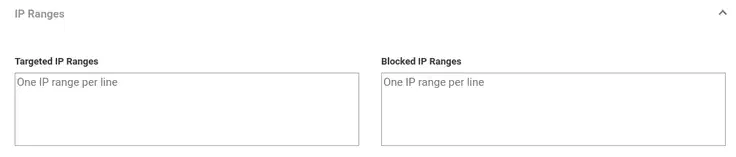
IP Ranges Targeting allows Advertisers to target or block specific IP addresses/ranges. This is particularly useful for 3/4G carrier targeting, where Advertisers can use additional IP ranges instead of/as well as the current options. For every campaign, Advertisers can target up to 1,000 lines.
Traffic Source and Referral URL Targeting
Advertisers can target users based on the source of their traffic or the referring URL. For example, your Advertisers can target users who came from a particular website or a specific affiliate network, enabling more granular control over where their ads are shown.
Domain targeting
Advertisers can target or block specific domains by putting them in the list of Targeted Domains or Blocked Domains. To effectively use this Ad Server precision targeting option for Advertiser clients, Advertisers need to put only one domain per line, inside of the boxes shown in the image below:

Behavioural Retargeting
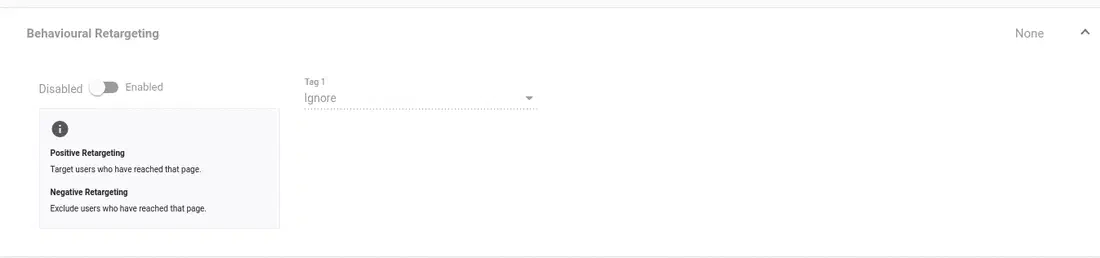
This feature is for targeting specific users who have already shown some interest in an Advertiser’s product or brand through one of their campaigns. For instance, if they already visited their product page but haven’t completed an action, like a conversion, or sale. By using this feature, Advertisers can target or exclude users who have reached certain Goals. For each goal, they can select Positive Retargeting or Negative Retargeting from the drop-down:
- Positive Retargeting means that users who meet a certain goal will be targeted more
- Negative Retargeting means that users who have reached that goal will be targeted less
To use this feature correctly, it’s necessary to use the tracking pixel consistently and to have run the campaign using this pixel for a minimum of three days before retargeting in order to flag the end users to be retargeted in a new campaign.
Custom Key/Value Targeting
Another powerful tool in the Ad Server precision targeting options for Advertiser clients list. EXADS Admins are able to define custom key value pairs (opens in a new tab) that Publishers can pass with ad requests. These keys and their associated values can be static, dynamic or based on a numeric value range. They can also be defined at ad server level. These pairs serve three primary functions:
- Passing Tokens: Publishers can send additional data to Advertisers via custom key-value pairs. For example, if a Publisher passes a custom key-value pair such as age=18, this information will be available for reporting and targeting. These tokens can then for instance be used as custom tokens on landing pages.
- Advertiser Targeting: Advertisers can target campaigns based on these key-value pairs. Custom key value pairs in targeting ensure that Advertiser campaigns reach the right audience. Advertisers can target campaigns based on the custom key values provided by Publishers.
- Statistics Reporting: Key-value pairs are now available in reporting, enabling data-driven decisions. This is how it works: When a Publisher passes a custom key-value pair, this data is logged alongside standard ad request data. The Advertiser can filter reports based on these custom values, generating insights to optimize performance.
Virtual Reality
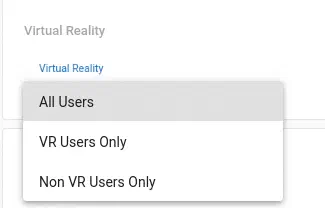
With this option, Advertisers can target or de-target users accessing in a VR environment. VR users can access either from a dedicated device, such as the Oculus Rift/Quest, or from a phone such as the Samsung S6+ placed in a VR headset. They can then select the following options from the drop-down:
- All Users: Targets all users whether using VR devices or not.
- VR Users Only: Targets only users using VR devices.
- Non-VR Users Only: Targets only users not using VR devices.
Contextual Targeting
Through EXADS’ Contextual Targeting tools, Advertisers can set up their campaigns to only place a bid on available ad inventory that matches the specified Contextual criteria. This means that the end user will be interested in the topic reflected in the ads and become more likely to click on them and convert, thus increasing advertising revenues. Customer segments on sub topics can also be created using behavioral targeting to make Advertiser ads more accurate. EXADS currently offers 2 kinds of Contextual Targeting:
- Category Contextual Targeting: Ads are shown on the Publisher’s website based on the categories that said Publisher has previously set. For example, if you are a Publisher and you own a Travel Search website, you can set your website ads to lay under the same category.
- Keyword Contextual Targeting: This category will show ads on websites based on specific keywords that Advertisers can choose when setting up their campaign and match with the website’s keywords.
Conclusion: Learn More about EXADS’ Tools & Ad Server precision targeting options for Advertiser Clients
As an Ad Network or Ad Server Admin, you want to make sure that your Advertiser and Publisher clients have all of the necessary tools to reach their advertising goals. This is why we built this list on Ad Server precision targeting options for Advertiser clients. Build your White-Label Self-Service Ad Server now and choose exactly what targeting options, ad formats and advertising tools you want to enable: Frequency Capping, Customizable Statistic Dashboards, RTB and Programmatic tools, Smart Bid and other bidding models, and more. Do you want to learn more about our powerful advertising features? Get in touch with our team now!